Edge labels
What a connection between two nodes means, the relationship types available, and what strength changes.
Dragging between two nodes draws a connection. A connection records that you think two things are related, and says how — nothing more.
A connection is a note, not a calculation
Connections never change your numbers
Drawing, retyping, or deleting a connection does not move a forecast, a simulation, or any node's value. Calculations use node values and formulas, not connection settings.
A connection explains your reasoning but does not perform a calculation. You can connect any two nodes.
Formulas are what actually move numbers, and a formula creates its own dependency by naming another node's code. The two overlap on purpose — Wire reads the connections you have already drawn and offers to turn them into a formula — but until you wire it, a connection is a statement about the world rather than part of the calculation.
A connection that a formula genuinely reads is drawn as a dashed line, and every other connection stays solid. That styling is derived from the formula as you edit it, so it is a read-out of what the formula uses rather than something you set.
Relationship types
Every connection carries a type. New connections start as Basic.
| Type | Marker | What it says |
|---|---|---|
| Basic | — | These two are related. No claim about how. |
| Causal | C | The source affects the target. |
| Evidential | E | The source is evidence about the target. |
| Necessary | N | The target cannot happen without the source. |
| Sufficient | S | The source alone is enough for the target. |
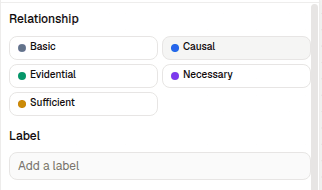
Each type has its own colour, and the marker is what you see on the line itself when the map is too dense for words.
Causal and evidential are the two that make a directional claim strong enough to have a size and a sign, so they are the two that get extra controls.
Impact and strength
Causal and Evidential connections carry two more settings:
- Impact —
positiveornegative. Whether more of the source means more, or less, of the target. New connections start positive, and a negative one is drawn in a different colour so the direction of the claim reads at a glance. - Strength —
low,medium, orlarge. How much it matters.
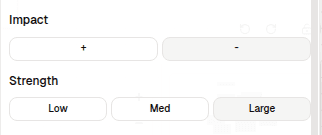
The other three types have no impact or strength. Changing a connection to Basic, Necessary, or Sufficient drops whichever of those settings it had, rather than keeping them hidden — so switching back gives you the defaults again, not what you set before.
Strength is a note for the people reading the map. Like everything else about a connection, it does not weight a calculation.
Labels
A connection can also carry free text. Use it when the relationship is specific enough that a type does not capture it — "only above 40% adoption" says more than Causal does.
Clear the field to remove a label.
Choosing a type
Most connections can stay Basic. Reach for a specific type when the distinction is one a reader would otherwise get wrong:
- Causal over Evidential when the source moves the target, rather than telling you about it. A price change is causal; a survey result is evidential.
- Necessary and Sufficient when the relationship is a gate rather than a dial. They make a much stronger claim than Causal, and they are worth reserving for when you mean them.