Sharing a project
Choose a project's audience within your organization or publish a read-only view on the internet.
Every project belongs to one organization. New projects start Private.
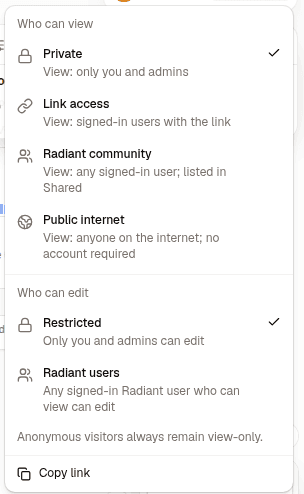
Who can see it
| Level | Who gets access |
|---|---|
| Private | The current project owner |
| Unlisted | Organization members with the link; hidden from the organization directory |
| Shared | Organization members; listed in the organization's Shared view |
| Public internet | Anyone with the public URL, including people without a Radiant account |
Organization Owners and Admins cannot open someone else's Private project through ordinary organization access. Public projects do not appear in other organizations' directories.
Anyone with a Radiant account can fork a Public internet project into their own organization. The fork copies the map without its forecasts, authors, or version history. The Radiant team may also list a Public internet project on Discovery, where everyone signed in can open and fork it. Change the audience to take it down.
Who can edit
A Private project's owner can edit it unless their organization role is Viewer. Choosing Unlisted, Shared, or Public internet lets organization Owners, Admins, and Members who can view it edit its contents. Viewers cannot edit. The sharing dialog explains this before you change a Private project into a nonprivate one.
Public visitors always get the same read-only view, even when signed into another organization. They can inspect the map and simulation previews, select a node or connection to read its details in the inspector, and copy nodes to paste into a map they can edit. They cannot use its chat, tasks, live presence, raw export, saved simulation history, or editing controls.
Managing and transferring a project
The current project owner manages sharing, deletion, and transfer. Organization Owners and Admins can also manage nonprivate projects. A Viewer role never grants these actions.
Choose Transfer ownership from the project's actions menu and select an eligible member of the same organization. The recipient cannot be banned, a Viewer, or over their project limit. Contributions remain attributed to their authors. If the recipient makes the project Private, only the new owner retains ordinary access.
Changing sharing takes effect for existing editing sessions as well as new visits.