Troubleshooting forecasts
Where to find forecast problems, what common messages mean, and how to get a blocked node working again.
When a node has no value or Run simulation is unavailable, Radiant explains why at the top of the inspector — for a formula node, at the top of its Formula section. Select the affected node to see its messages, or open the inspector with nothing selected to see every forecast problem on the map. While it is closed, a red dot on the inspector button says there is one.
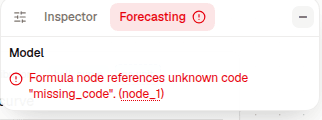
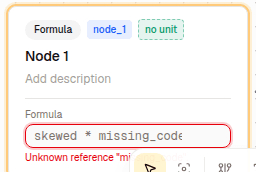
The node itself marks the offending field, so you can see which part of the formula the message is about.
Start with the first blocked node
One incomplete node can also block formulas that depend on it. Fix the earliest affected input first; the messages on downstream nodes usually disappear on their own.
The rest of the map can still work
A blocked node does not stop unrelated parts of the map. Radiant continues to show preview values wherever it has enough information.
A node is missing a value
Check the node's required fields:
- Parameter needs a number.
- Binary probability needs a probability between 0 and 1.
- Distribution needs a valid set of parameters for its selected family.
- Base rate needs historical rows and at least one selected row.
- Formula needs an expression that Radiant can resolve.
After filling in the missing value, check the node again. Any formulas that use it should recover automatically.
A formula does not resolve
The message in the inspector normally identifies one of these problems:
- Invalid expression. Check the operators, parentheses, and function syntax against Formula syntax.
- Unknown reference code. Formulas use node codes, not titles. Compare the formula with the codes shown in the inspector.
- Unknown function. Use one of the supported functions listed in the formula reference.
- Invalid distribution query. Functions such as
cdf,quantile,prob_gt, andprob_ltneed a node reference as their first argument. - Dependency cycle. Two or more formulas eventually depend on one another. Break the loop by replacing one dependency with an independent input.
Rename titles freely, codes carefully
Changing a node's title is safe. Changing its reference code leaves existing formulas pointing to the old code until you update them.
Reference codes conflict
Every forecast node needs a unique reference code. If a code is missing or used by more than one node, edit it in the inspector, under the node's title. See Reference codes for the allowed format.
A Metaculus question has no value
Try refreshing the question if its data is missing or out of date. A question may also have no community forecast yet.
Only binary, numeric, and discrete questions can feed a forecast. Date, multiple-choice, group, and conditional questions can still appear on the map as reference cards, but formulas cannot use them as numeric inputs.
Predictions cannot be combined
Radiant ignores a prediction whose shape does not match the node and tells you how many were skipped. Compatible predictions still count.
Predictions on a Distribution node must also use the same distribution family. If contributors used different families, agree on one family before the node can produce a combined value.
A base rate does not work
A Base Rate needs at least one selected historical row. If it produces a probability, every
selected row must also be 0 or 1; otherwise switch the output to a numeric value or correct the
rows.
A simulation fails
If Run simulation is disabled, fix the problem named beside the button. If a run starts but fails, its message contains the immediate reason.
Very large values, invalid arithmetic, or division by a value near zero can also produce unusable samples. Check the formulas feeding the affected result and narrow unrealistic input ranges where appropriate.
If the message is still unclear
Copy the message from the inspector and include the affected node when asking the assistant or the team for help. The exact message is more useful than a screenshot of an empty result.