Versions and restore
How a map's earlier states are kept, how to go back to one, and how to undo going back.
A version is a stored state of a map you can return to. Versions are how you recover from a change that undo cannot reach — an agent's edit, someone else's edit, or anything from a previous session.
Open them from Versions in the project controls. The timeline opens in the left column, over the assistant panel; closing it leaves the assistant exactly as it was.
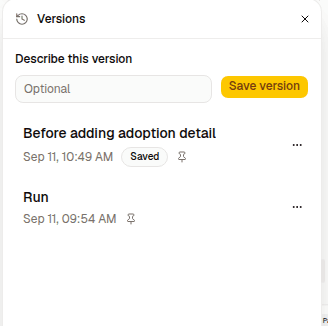
Where versions come from
| Written by | Shows as |
|---|---|
| Pressing Run simulation | Run |
| Pressing Save version | Saved |
| Radiant, after the map has moved on | Autosaved |
| A restore, capturing what it replaced | Before restore |
Automatic capture needs a starting point
A project with no version yet captures nothing on its own. Autosaving records drift from a point someone chose, so a Run or a Save has to establish one first. A project nobody ever runs or saves keeps no history at all.
Radiant creates an autosave after the map changes and the newest version is more than ten minutes old. An idle map produces nothing.
Naming and pinning
Any version can be given a name, and renamed later.
Autosaves can also be pinned, which protects them from being cleaned up. A pin icon marks every version that will be kept — whether it earned that by being a Run, a Save, a Before-restore, or by being pinned.
What gets cleaned up
Only Autosaved versions are thinned, and only when a new one is written:
- Every autosave for the first 24 hours
- Hourly for 7 days
- Daily for 30 days
- Monthly for 12 months
- Yearly beyond that
Saved, pinned, and Before restore versions are never removed. Neither is a version a saved run points at — pruning that would quietly reduce the run to a results-only entry.
Looking at one
Clicking a version swaps the map area for a read-only preview of it. Your live map stays connected underneath; you are previewing, not leaving.
Restoring
Restore replaces the live map with the selected version. Everyone with the project open sees the restored state.
Restored nodes and connections keep their original authors.
A restore is itself undoable
Every restore first stores a Before restore version of what it is about to replace. If you restore the wrong thing, restore that.
Restoring also discards the undo stack of everyone with the map open, including yours. Those steps were built against the map the restore replaced.
Restore as a new map
Restore as a new map duplicates the project from that version instead, leaving the current map untouched. Use it when you want the old state and the new one — comparing two approaches rather than choosing between them.
Who can do what
| Role | Read the timeline | Save and restore |
|---|---|---|
| Owner and admins | Yes | Yes |
| Editors | Yes | Yes |
| Viewers | Yes | No |
| Anonymous readers | No | No |
Versions that cannot be restored
Some versions created with an older Radiant format may remain viewable but cannot be restored. In that case, Radiant disables the restore actions instead of risking an invalid map.
Versions and runs
A saved run stores its own frozen copy of the map, which is why reopening a run shows the map as it was. That copy is a version, and it is protected from cleanup for as long as the run exists.